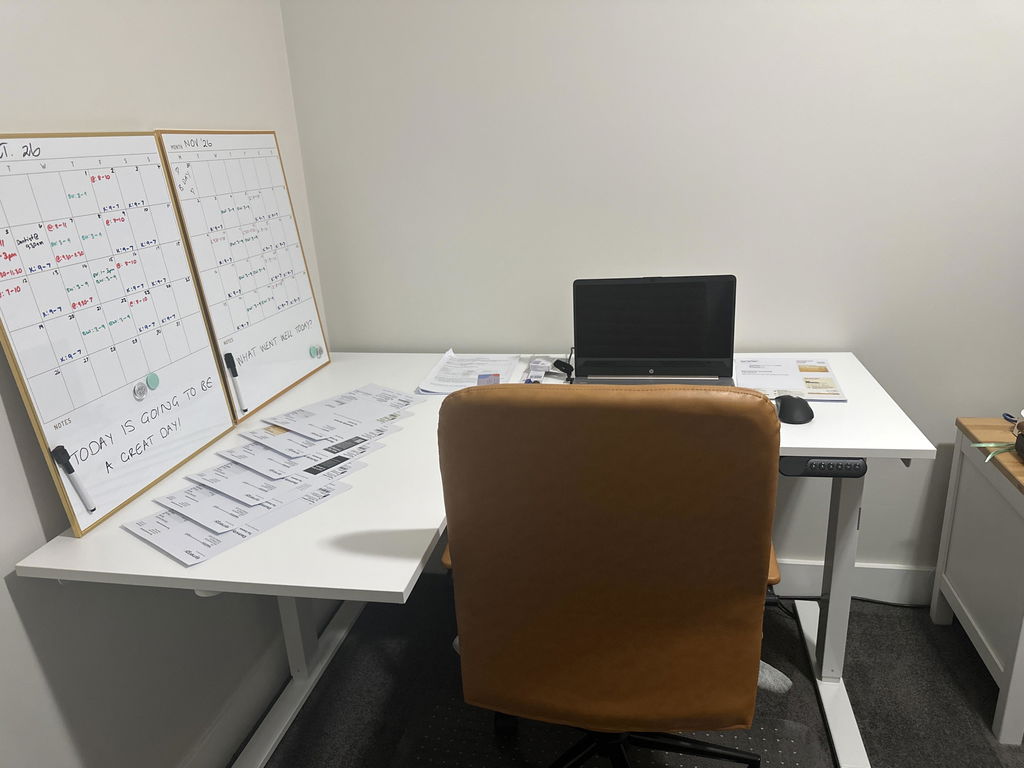
L-shaped electric sit-stand workspace
Need More Desk Space Without Giving Up Sit-Stand Flexibility?
A straight desk works well for a simple computer setup, but once you add
extra screens, paperwork, notebooks and everyday work equipment, available
space can disappear quickly.
The Artiss Electric Dual Motor L-Shaped Standing Desk
combines a generous 140 × 110cm corner workspace with
smooth electric height adjustment from approximately
72cm to 121cm.
Configure the return on the left or right to suit your room, save up to
four favourite heights and move between sitting and standing at the touch
of a button.
More working space, a flexible corner layout and sit-stand adjustment in one desk.
Create separate zones for computer work, paperwork, meetings or creative
tasks while keeping your entire workstation height adjustable.
Designed Around a More Flexible Workday
L-SHAPE
Generous Corner Workspace
The 140 × 110cm L-shaped layout gives you additional working surface
within a practical corner-based footprint.
2X
Dual-Motor Adjustment
Two motors drive smooth electric height changes across the larger
L-shaped desktop.
4
Four Memory Presets
Save your preferred sitting and standing positions so you can return
to them without manually finding the same height each time.
L / R
Left or Right Configuration
Configure the return section to suit the orientation of your room and
the way you prefer to organise your workspace.
Why Choose an L-Shaped Standing Desk?
The biggest advantage is usable workspace.
Instead of arranging everything along one straight line, an L-shaped
desk creates two connected work surfaces around you.
Your primary computer setup can sit in one area while the return provides
space for paperwork, a laptop, notebooks, documents or other equipment.
Because the entire desk is height adjustable, those work zones move
together when you change between sitting and standing.
Create Separate Zones Without Needing Two Desks
Computer Setup
Paperwork
Laptop & Devices
General Workspace
The additional return surface gives you somewhere to move secondary tasks
rather than crowding everything directly around your keyboard and mouse.
This can make a busy home office feel more organised and give frequently
used equipment its own dedicated space.
Set the Corner Up on the Side That Works for Your Room
The spliced desktop can be configured in
two installation orientations, allowing the return to be
positioned to suit your available corner and preferred room layout.
This makes the desk easier to plan around doors, walls, windows, storage
and the natural flow of your home office.
It also gives you more freedom to decide which side you want to use for
your main computer work and which side becomes your secondary work surface.
Dual Motors Move the Larger Desktop Smoothly
An L-shaped workstation has more surface area than a standard straight
desk, so reliable powered movement becomes particularly important.
The Artiss desk uses a
dual-motor electric system to raise and lower the
workstation through its height range.
Maximum adjustment speed is approximately
25mm per second, making changes between your saved
sitting and standing positions quick and straightforward.
Adjust from Approximately 72cm to 121cm
Electric height adjustment lets you fine-tune the desk through a broad
range rather than selecting from fixed height settings.
The desk adjusts from approximately
72cm at its lowest position to 121cm at its highest.
This gives you flexibility to find comfortable seated and standing working
heights within the desk's adjustment range.
i
Your ideal desk height is individual.
Set the desktop so your shoulders can remain relaxed and your forearms
can work comfortably around keyboard height.
Save Your Favourite Heights and Let the Desk Remember Them
Once you find a desk height that works well, you should not need to
rediscover it every time you change position.
The digital control panel can save
up to four preset heights.
You might use one for seated work, one for standing and keep additional
settings available for another user or another working position.
Memory presets remove much of the friction from using a sit-stand desk
regularly because returning to your preferred settings becomes quick and easy.
Make Position Changes Part of the Working Day
A height-adjustable desk gives you another working position rather than
requiring you to choose between sitting all day or standing all day.
Use the electric adjustment to change positions when it feels useful,
then continue moving away from the desk for normal walking and activity.
1
Set Your Seated Height
Position the desk around your chair so your shoulders can remain
relaxed while you keyboard and mouse.
2
Save Your Standing Height
Raise the desk to a comfortable standing position and save it to one
of the memory presets.
3
Change Position Regularly
Use the presets to make switching between your preferred working
heights simple throughout the day.
The Goal Isn't to Stand All Day
A sit-stand desk is most useful because it allows your working position
to change.
Alternate between sitting and standing based on comfort and task, and
continue taking normal walking and movement breaks.
Think of standing as another available posture rather than the
replacement for sitting.
85kg Maximum Load Capacity
The desk is rated for a maximum load of
85kg, providing plenty of capacity for a typical home
office workstation.
This allows you to organise monitors, computer equipment, peripherals,
paperwork and everyday office accessories across the larger L-shaped surface.
When planning your setup, remember that the load rating applies to the
combined equipment positioned on the desk.
Oak-Finish Desktop for a Warm, Contemporary Workspace
The desktop uses an
18mm particle-board construction with an oak finish,
paired with a black metal frame.
The timber-look surface brings some warmth into the workstation while the
darker frame keeps the overall design clean and contemporary.
The combination works easily with black monitors, office chairs and
common home-office accessories.
140 × 110cm Overall Footprint
The complete desk measures approximately
140cm × 110cm.
This provides considerably more usable working surface than a small
laptop desk while remaining practical for a dedicated home-office corner.
Planning your room
Measure Your Corner Before Ordering
An L-shaped desk uses space differently from a straight desk.
Check that your room can comfortably accommodate the
140 × 110cm footprint, with enough surrounding space
for your chair and normal access around the workstation.
Decide which side you want the return on before assembly so you can
configure the desktop around your preferred room layout.
Built-In Cable Management Helps Keep the Larger Workspace Organised
A larger desk often means more screens, chargers and computer equipment,
which can quickly lead to more cables.
Integrated cable management helps organise your workstation and keeps
loose cabling away from the main work surface.
i
Leave enough cable length for desk movement.
Your power, monitor and peripheral cables need sufficient slack to move
safely through the full sit-stand height range.
Keep Headphones Off the Desktop
A built-in headphone hook provides a convenient dedicated place for a
headset or headphones when they are not being used.
Small details like this help preserve the usable desktop area and keep
frequently used equipment close without adding more accessories to the
surface.
Particularly Well Suited to a Dedicated Home Office
Home Offices
Corner Workspaces
Multi-Screen Setups
Hybrid Work
If you regularly work from home and have moved beyond a simple laptop
setup, the extra desktop surface makes it easier to create a workstation
that accommodates both technology and the other materials you use during
your day.
Four Presets Are Useful in Shared Workspaces Too
The memory controller can also be useful when more than one person uses
the desk.
Each user can establish preferred working heights and use the available
presets to return the desk to those settings more quickly.
This makes an electrically adjustable workstation much easier to adapt
between different users than a fixed-height desk.
Configure the Desk Around Your Space
1
Choose Your Orientation
Decide whether the return section works best on the left or right
based on your room and workflow.
2
Organise Your Work Zones
Position your primary computer equipment in front of your main working
position and use the return for secondary tasks and equipment.
3
Save Your Heights
Fine-tune your preferred seated and standing positions, then store
them using the digital memory controller.
Set Up the Desk Around the Equipment You Use Most
More desk space is most useful when your primary equipment remains close
and easy to reach.
Keep your keyboard and mouse within comfortable reach, position your
primary monitor in front of your main working position and use the
secondary surface for less frequently used equipment.
Avoid spreading essential items across the full L-shape if it means
constantly reaching or twisting to access them.
i
Use the extra space to organise your workstation, not to increase reach.
Your most frequently used equipment should still remain close to you.
Make the Standing Position Comfortable Too
If the desk is positioned over timber, concrete, laminate or another firm
floor, standing directly on that surface may become uncomfortable during
longer standing periods.
A suitable anti-fatigue mat can add cushioning beneath your feet when you
raise the desk, then move aside when you return to sitting.
Comfortable footwear and regular movement remain important regardless of
the surface beneath you.
Product Details
Product Type
Electric L-shaped sit-stand desk
Overall Footprint
Approximately 140 × 110cm
Height Range
Approximately 72–121cm
Maximum Speed
Approximately 25mm/s
Control Panel
Digital display controller
Memory Positions
Up to four preset heights
Desktop Configuration
L-shaped spliced tabletop with left or right installation options
Desktop Material
Particle board
Desktop Thickness
Approximately 18mm
Cable Management
Integrated
Headphone Storage
Integrated headphone hook
Included
Artiss sit-stand desk and assembly manual
Best For
Home and hybrid workers wanting a larger corner workspace with
convenient electric sit-stand adjustment
✓
1-Year Warranty
The Artiss Electric Dual Motor L-Shaped Standing Desk is covered by a
one-year warranty. If a covered fault develops during
the warranty period, we'll work with you to arrange repair or replacement
in accordance with our warranty terms.
Give Yourself More Workspace and More Ways to Work
With a 140 × 110cm configurable L-shaped desktop, dual electric motors,
four memory presets and a 72–121cm height range, the Artiss L-Shaped
Standing Desk gives you the room to organise a serious home workstation
while making it easy to change between sitting and standing throughout
your day.