Designed for medium to large right hands
Wrist Feeling the Effects of a Full Day on the Mouse?
If your job involves hours of navigating, clicking and scrolling, the position
you hold your hand in all day can make a meaningful difference to how your
wrist and forearm feel by the time you finish work.
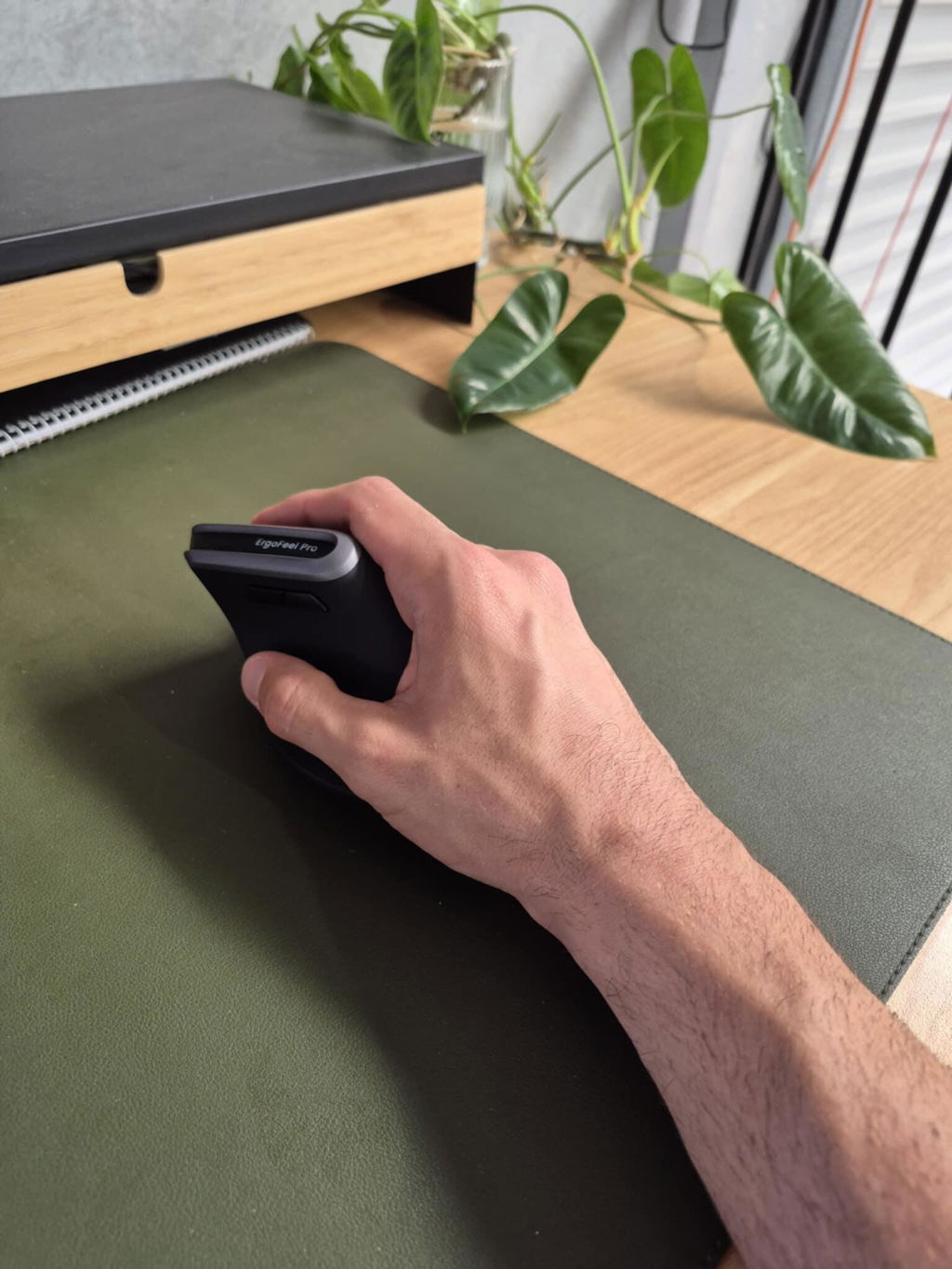
The ErgoFeel Pro Vertical Ergonomic Mouse positions your hand
in a more upright, handshake-style posture instead of the traditional
palm-down position used with a standard mouse.
Designed specifically for right-handed users with medium to large hands,
ErgoFeel Pro combines ergonomic positioning with smooth tracking,
multi-device wireless connectivity and five adjustable DPI settings.
Ergonomic comfort without giving up the features of a good work mouse.
ErgoFeel Pro gives you the benefits of a vertical hand position
while retaining the smooth cursor control, device switching and adjustable
tracking speed you rely on during everyday computer work.
Designed for the Wrist Fatigue That Builds Across a Workday
Both current ErgoFeel Pro reviewers purchased the mouse while experiencing
wrist discomfort, and both specifically reported improvements in comfort
while using it for everyday computer work.
Customers also highlight its smooth operation and the way the larger vertical
shape feels comfortable in the hand.
✓
More Upright Hand Position
The vertical body allows your hand and forearm to work in a more neutral
orientation than a conventional palm-down mouse.
✓
Comfortable Larger-Hand Fit
The substantial body is designed around medium to large right hands,
providing more surface area for the palm to rest against.
✓
Smooth Everyday Tracking
Customer feedback specifically highlights smooth tracking and easy
day-to-day mouse control.
✓
Responsive Scroll Wheel
A metal scroll wheel provides smooth, responsive navigation through
documents, webpages and software.
Why Change the Angle of Your Mouse Hand?
A conventional mouse typically keeps your forearm rotated so the palm faces
down towards the desk.
A vertical mouse changes that position by rotating the hand onto its side,
closer to the natural posture you use when shaking someone's hand.
For people performing repetitive mouse work for hours every day, changing
that working position may help reduce the fatigue and discomfort associated
with continually using the same wrist and forearm posture.
Medium to Large Hands — This Is Important
One of the most important considerations when choosing an ergonomic mouse
is whether the mouse actually fits your hand.
ErgoFeel Pro measures approximately
10.5cm long × 8cm wide × 8cm high and is designed for
medium to large right hands.
The larger body allows more of your palm to remain supported while your
fingers reach the primary buttons and scroll wheel.
If you have a small hand, this mouse may feel unnecessarily large.
A smaller vertical mouse such as the Elevate may provide a better fit.
A Strong Fit for Everyday Computer Work
Medium–Large Hands
Right-Handed Users
Long-Hour Computer Work
Wrist & Forearm Discomfort
It is particularly well suited to office and home-office users who want
ergonomic positioning without moving to a specialised pointing device
or losing familiar mouse functionality.
One Mouse for Up to Three Devices
If your desk has more than one computer, laptop or compatible device,
ErgoFeel Pro reduces the need for separate mice.
You can connect using:
B
Two Bluetooth Connections
Pair the mouse with up to two compatible Bluetooth devices and switch
between them as required.
U
Wireless USB Receiver
Use the supplied USB receiver for an additional computer or device
with simple plug-and-play connectivity.
3
Up to three connected devices:
ideal if you regularly move between a work laptop, personal computer
or another compatible device at the same workstation.
Set the Cursor Speed to Suit the Way You Work
Mouse sensitivity isn't one-size-fits-all either.
ErgoFeel Pro provides five adjustable DPI levels, allowing
you to change how far the cursor moves in response to your hand movement.
Choose a slower setting when you want more controlled cursor movement, or
increase the sensitivity when you want to cover more screen area with
less physical movement.
i
Higher isn't automatically better.
Choose the DPI setting that lets you move naturally without repeatedly
making large movements or struggling to position the cursor accurately.
Made for Real Workflows, Not Just Ergonomic Positioning
-
Vertical ergonomic hand position
-
Dual Bluetooth connectivity
-
Wireless USB receiver
-
Up to three connected devices
-
Five adjustable DPI settings
-
Smooth metal scroll wheel
-
Soft-touch rubber exterior
-
Right-handed ergonomic design
Comfortable in the Hand — Professional on the Desk
Ergonomic equipment doesn't need to look clinical.
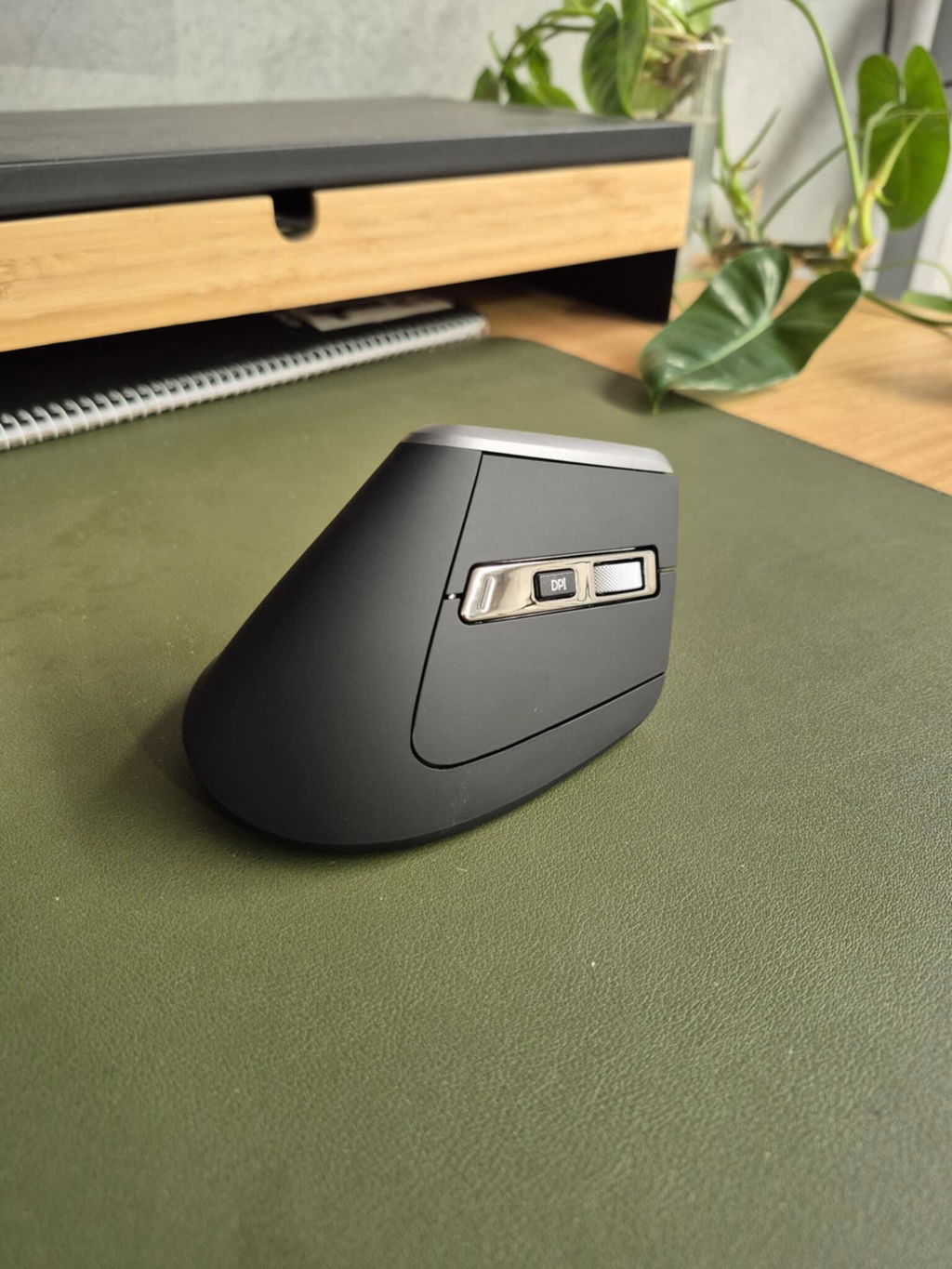
ErgoFeel Pro combines a matte black soft-touch exterior with chrome detailing
and a metal scroll wheel, giving the mouse a clean, professional finish.
More importantly, the larger contoured body gives your palm somewhere to
rest while maintaining the vertical hand position.
Already Experiencing Wrist Pain?
Existing ErgoFeel Pro customers have specifically purchased the mouse
because of wrist discomfort and reported that the change in mouse position
has helped them during everyday computer use.
However, an ergonomic mouse isn't a medical treatment and wrist or forearm
pain can have many causes.
If you have persistent symptoms, an injury or significant discomfort,
consider discussing your workstation and mouse use with your physiotherapist,
occupational therapist, hand therapist or other treating health professional.
New to Vertical Mice?
Switching from a conventional mouse changes both the angle of your hand and
the way you guide the mouse across the desk.
It may feel unfamiliar initially — particularly if you've used a standard
mouse for many years.
Give yourself some time to become familiar with the position rather than
judging the mouse entirely on the first few minutes of use.
Get More from Your Ergonomic Mouse
1
Keep the Mouse Close
Position it beside your keyboard so you don't repeatedly reach your arm
away from your body.
2
Relax Your Grip
Let your hand rest naturally against the larger body instead of squeezing
the mouse tightly.
3
Choose Your DPI
Test the different sensitivity settings and choose the one that allows
smooth cursor movement with comfortable hand and arm motion.
Simple AA Battery Power
ErgoFeel Pro is powered by one AA battery, allowing the
battery to be replaced immediately when required rather than waiting for
the mouse to recharge.
The AA battery is not included, so have one available when setting up your
mouse for the first time.
Product Details
Mouse Style
Vertical ergonomic mouse
Hand Orientation
Right-handed
Hand Size
Medium to large
Dimensions
10.5cm long × 8cm wide × 8cm high
Bluetooth
Two Bluetooth device connections
USB Wireless
Wireless USB receiver included
Connected Devices
Up to three devices
DPI
Five adjustable sensitivity levels
Scroll Wheel
Smooth metal scroll wheel
Exterior
Matte black soft-touch rubber finish with chrome accents
Compatibility
Compatible with Windows and Mac computers with supported Bluetooth
or USB connectivity
Power
1 × AA battery — not included
ErgoFeel Pro or Elevate?
The biggest difference is fit.
Choose ErgoFeel Pro if you're right-handed with a
medium to large hand and want multi-device connectivity
plus adjustable DPI control.
Consider the Elevate Vertical Ergonomic Mouse if you have
a small to medium hand and want a more compact vertical mouse.
?
Not sure about your hand size?
Use the Ask a Question option on this page and our team can help you
compare the ergonomic mice in our range.
✓
1-Year Full Replacement Warranty
The ErgoFeel Pro Vertical Ergonomic Mouse is backed by a
one-year full replacement warranty. If your mouse
develops a fault within the warranty period, we'll replace it in
accordance with our warranty terms.
Better Hand Position. All the Control You Still Need.
If you have a medium to large right hand and your wrist is feeling the effects
of long days at the computer, ErgoFeel Pro gives you a more upright way to work
without sacrificing smooth tracking, multi-device connectivity or control
over your cursor speed.