Ergonomic comfort with advanced productivity controls
Want a Vertical Mouse Without Giving Up the Features You Use Every Day?
The Jomaa Vertical Ergonomic Mouse combines a comfortable
vertical right-handed shape with the advanced controls you would expect
from a modern productivity mouse.
Connect to up to three devices, scroll horizontally
through spreadsheets and wide documents, navigate forwards and backwards
with dedicated buttons and recharge via USB-C.
Designed around a medium hand fit, the Jomaa is a strong
option for office and home users who want ergonomic hand positioning
without sacrificing efficient navigation and multi-device flexibility.
Ergonomic hand positioning meets serious everyday functionality.
Switch between devices, scroll horizontally, navigate documents and keep
working with a mouse designed around a more upright right-handed grip.
Built for Comfort and Efficient Computer Work
VERT
Ergonomic Vertical Shape
The sculpted right-handed design places the hand in a more upright
position than a conventional flat mouse.
3 DEV
Multi-Device Connectivity
Connect across two Bluetooth channels plus the wireless USB receiver
and move between up to three devices.
↔
Horizontal Scrolling
Move sideways through spreadsheets, timelines and wide documents
without relying only on traditional vertical scrolling.
USB-C
Rechargeable Power
The built-in battery recharges through USB-C, removing the need to
regularly replace disposable batteries.
Why Choose a Vertical Mouse?
A conventional mouse generally positions the hand flatter against the
desk surface.
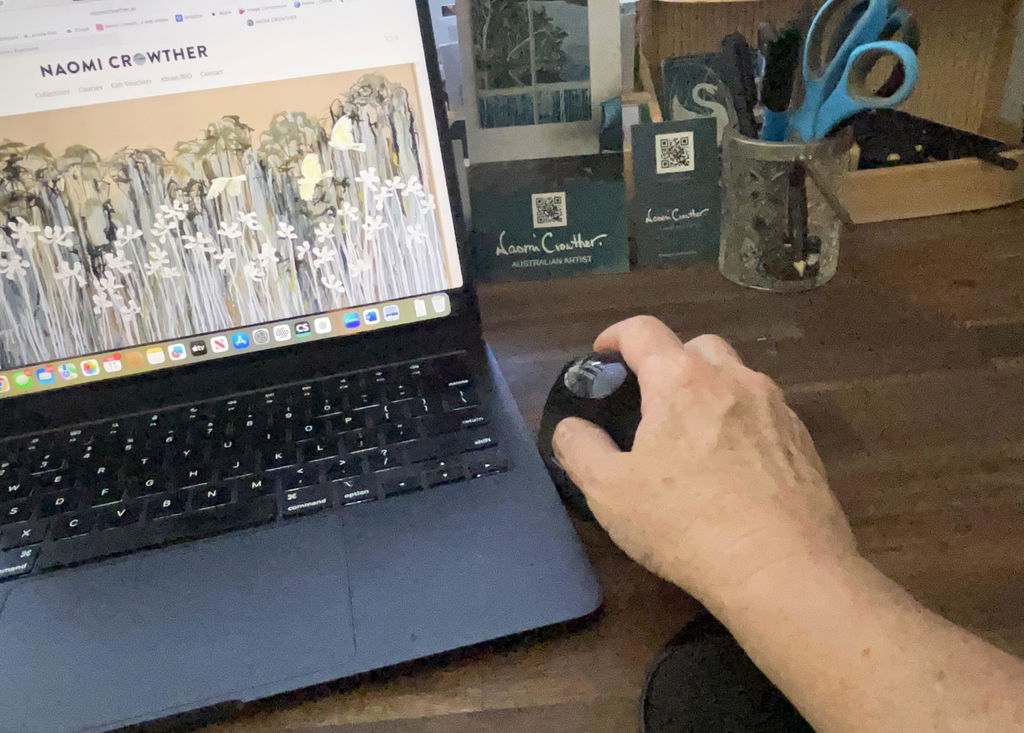
The Jomaa's vertical shape changes that relationship by allowing your
hand to rest in a more upright orientation around the mouse.
For many users, that can feel more natural during prolonged computer
work, particularly when the mouse is positioned close to the keyboard
and the hand remains relaxed.
The goal is not to grip the mouse tightly. Let your hand rest around the
sculpted body and use light movements to control the cursor.
Shaped Specifically for Medium-Sized Hands
Mouse comfort is strongly influenced by how well the device fits your hand.
The Jomaa is designed around a
medium hand size, allowing the fingers to reach the main
controls while the palm remains supported around the vertical body.
That makes it particularly well suited to right-handed users who want a
substantial ergonomic mouse without moving into an oversized design.
Control Up to Three Devices from One Mouse
The Jomaa is designed for workspaces where one computer is not always enough.
Use its two Bluetooth connections alongside the
2.4GHz wireless USB receiver to connect the mouse across
up to three compatible devices.
Switch between them using the device controls rather than moving between
separate mice throughout the day.
Desktop Computer
Work Laptop
Home Laptop
Multi-Device Desks
Horizontal Scrolling Makes Wide Work Easier to Navigate
One of the Jomaa's standout productivity features is its
horizontal scroll control.
Instead of relying solely on a conventional vertical wheel, you can move
laterally through compatible content such as large spreadsheets, wide
tables, timelines and documents.
This is particularly useful when your work regularly extends beyond the
visible width of the screen.
Smart Controls Keep Common Actions Close to Your Fingers
The Jomaa includes additional action controls designed to make common
computer tasks easier to access without relying entirely on keyboard shortcuts.
Smart action buttons provide convenient access to application and workflow
functions, while dedicated navigation buttons make moving backwards and
forwards through compatible browsers and documents quicker.
Available functions can vary depending on your operating system,
application and device configuration.
Navigate Back and Forward Without Returning to the Screen Controls
Dedicated back and forward buttons give your thumb quick access to common
navigation commands.
They are particularly convenient for web browsing, document navigation
and other workflows where you repeatedly move between pages or locations.
Keeping these controls directly on the mouse can make repetitive navigation
feel quicker and more fluid.
Particularly Useful for Spreadsheet and Document-Heavy Work
Spreadsheets
Data & Reporting
Document Work
General Office Use
The combination of horizontal scrolling, navigation buttons and
multi-device connectivity makes the Jomaa particularly well suited to
users who spend much of their day moving through information on screen.
Recharge via USB-C
The Jomaa uses a
built-in rechargeable battery, so there is no need to
continually keep replacement AA or AAA batteries nearby.
Connect a USB-C charging cable when required and return the mouse to your
normal wireless setup once charged.
This is particularly convenient for users who regularly move between
office, home and hybrid work environments.
Clean Styling for Modern Workspaces
The Jomaa is available in
black or white, giving you the choice of a classic dark
finish or a lighter option for modern desk setups.
Its streamlined shape keeps the mouse looking like a premium productivity
device rather than an overly clinical ergonomic accessory.
Position the Mouse Close and Let Your Hand Relax
1
Keep It Beside the Keyboard
Position the mouse close enough that your upper arm can remain near
your body rather than reaching out to the side.
2
Let Your Hand Settle
Rest your hand around the vertical shape without gripping harder than
necessary.
3
Move from the Arm
Use smooth controlled movements and allow your hand, wrist and forearm
to remain relatively relaxed.
New to a Vertical Mouse?
A vertical mouse can feel different at first because the hand is
positioned differently and the buttons sit at a different angle from a
traditional flat mouse.
Start with normal office tasks and allow yourself some time to become
familiar with the shape, scrolling controls and navigation buttons.
Most of the adjustment is simply learning where the controls sit while
allowing the hand to remain relaxed around the mouse.
Use the Mouse as Part of a Well-Arranged Workstation
Mouse comfort is influenced by more than the mouse itself.
Keep the Jomaa close to the keyboard, avoid unnecessary reaching and make
sure your desk and chair allow the shoulders and forearms to remain
comfortable while you work.
A narrower keyboard can also help keep the mouse closer to your body by
reducing the distance your arm needs to travel to reach it.
i
Comfort varies between users.
If you experience persistent hand, wrist, forearm or shoulder symptoms,
consider seeking advice from an appropriate health professional.
Product Details
Product Type
Wireless vertical ergonomic mouse
Hand Orientation
Right-handed
Hand Fit
Medium hand sizes
Connectivity
Dual Bluetooth + 2.4GHz wireless USB receiver
Connected Devices
Up to three compatible devices
Power
Built-in rechargeable battery
Navigation Buttons
Back and forward controls
Smart Action Controls
Yes; available functions may depend on operating system and software
Best For
Right-handed users with medium-sized hands who want ergonomic vertical
positioning, multi-device connectivity and advanced scrolling and
navigation controls
✓
1-Year Warranty
The Jomaa Vertical Ergonomic Mouse is covered by a
one-year warranty. If a covered fault develops
during the warranty period, we'll work with you to arrange repair or
replacement in accordance with our warranty terms.
Ergonomic Comfort Without Giving Up Productivity
With its medium-hand vertical design, three-device wireless connectivity,
horizontal scrolling, smart navigation controls and USB-C rechargeable
power, the Jomaa gives you a comfortable right-handed mouse built for
serious everyday computer work.