


Ergo Keyboard Combo - No More Pain Ergonomics

Ergo Keyboard Combo

Wireless Keyboard + Wireless Numeric Keypad
$106.00
Skip to product information
Ergo Keyboard Combo - No More Pain Ergonomics

Ergo Keyboard Combo

62 reviews

$106.00

Pickup available at No More Pain Ergonomics Warehouse

Usually ready in 24 hours

View store information

Ergo Keyboard Combo

Wireless Keyboard + Wireless Numeric Keypad

No More Pain Ergonomics Warehouse

Pickup available, usually ready in 24 hours

Unit 6/53 Morrisby Street
Geebung QLD 4034
Australia

Estimated delivery
Mon 21 Sep – Mon 21 Sep
Business days only. Order before 12pm for fastest dispatch. Choose your preferred courier at checkout.
New customer offer
Save 5% on your first order — use this code at checkout:
I'MNEW Tap to copy
Discount applied at checkout. Exclusions may apply.

Not sure if this is right for you?

Need help choosing? Ask our expert team a question — we’re here to help you.

Less reaching. More comfortable computer work.

Your Keyboard Could Be Pushing Your Mouse Further Away Than It Needs to Be

On a standard full-size keyboard, the built-in number pad takes up valuable space on the right-hand side — pushing your mouse further away from your body.

That extra reach may not seem significant at first, but over hours of computer work it can leave your arm sitting further away from your body and contribute to fatigue or discomfort through the shoulder, arm and upper body.

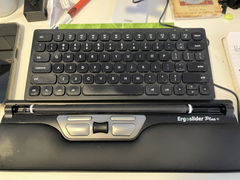
The Ergo Keyboard Combo solves that problem with a compact 30cm-wide low-profile keyboard and a separate wireless numeric keypad that you only position beside the keyboard when you actually need it.

The ergonomic benefit isn't complicated — it gives your mouse somewhere better to sit.

By removing the permanently attached numeric keypad from the right-hand side of your keyboard, you can position your mouse closer to your body and reduce the amount of outward reaching required during everyday computer work.

Designed for People Who Spend Their Day Moving Between Keyboard and Mouse

Customer feedback consistently highlights the same advantages: the compact size, slim profile, smooth typing experience and the freedom to use the numeric keypad only when required.

Customers experiencing arm and general workstation discomfort have also reported improved comfort after changing to the compact setup.

Bring Your Mouse Closer

The compact keyboard reduces the distance between your main typing area and your mouse, helping you keep your mouse arm closer to your body.

Use the Number Pad Only When Needed

Keep the numeric keypad out of the way during general typing and mousing, then bring it into position when numerical entry is required.

Slim, Low-Profile Design

The 1.9cm-high keyboard provides a low-profile typing surface without the bulk of many traditional desktop keyboards.

Smooth Everyday Typing

Customers regularly describe the keyboard as smooth, light and easy to use during everyday computer work.

Why Keyboard Width Matters

The letters you type on occupy only part of a standard keyboard. A fixed numeric keypad adds considerable width to the right-hand side.

For a right-handed mouse user, that extra width means the mouse generally needs to sit further away from the centre of your body.

The Ergo Keyboard Combo separates those two functions.

Your main keyboard stays compact at just 30cm wide, allowing your mouse to sit closer to the keyboard and your body during general work.

When you need numbers, simply position the separate keypad wherever it works best for the task.

A Great Fit for Mouse-Heavy Computer Work

Office Work
Home Offices
Mouse-Heavy Workflows
Ergonomic Workstations

It is particularly useful for people who move frequently between keyboard and mouse and want to reduce unnecessary reaching during the working day.

Changing a Small Part of Your Desk Setup Can Make a Noticeable Difference

A number of Ergo Keyboard Combo customers originally changed their keyboard because they were already experiencing discomfort while working.

Customers have reported improvements in arm discomfort and overall comfort, while others specifically comment on noticing a difference after moving to a compact keyboard and separate number pad.

i

Managing persistent pain? A keyboard can change your working position, but it isn't a medical treatment. Ongoing arm, shoulder, wrist or neck symptoms should be discussed with your treating health professional or an appropriately qualified ergonomic assessor.

Keep the Number Pad — Without Keeping It in the Way

Compact keyboards are useful ergonomically, but many people still need a numeric keypad for spreadsheets, accounting, data entry or other numerical work.

That's why the Ergo Keyboard Combo includes a separate wireless numeric keypad.

1

Use It When You Need It

Bring the keypad beside your keyboard for numerical work and move it away when returning to mouse-heavy tasks.

2

Position It on Either Side

Because the keypad isn't physically attached, you can position it on either side of the keyboard depending on your preferred workflow.

A popular workflow: keep the keypad away from the keyboard during normal typing so your mouse remains close, then move the keypad into position only for dedicated numerical tasks.

Important before you buy

Heavy Writing or Editing Work? Check the Key Layout First.

The compact keyboard itself does not include dedicated Home, End, Page Up or Page Down keys.

These navigation functions are available on the separate numeric keypad, but they are not built into the main compact keyboard.

If you regularly rely on dedicated Home, End, Page Up and Page Down keys while writing, editing or performing administrative work, consider whether this layout will suit your workflow before purchasing.

The Ergo Keyboard Combo is best suited to users who value reduced keyboard width and closer mouse positioning more highly than having every traditional navigation key permanently available on the main keyboard.

Compact Ergonomics Is About Choosing What Needs to Stay in Front of You

A compact keyboard gains its ergonomic advantage by removing rarely used keys and the permanently attached number pad from the main keyboard footprint.

If you constantly use every key on a traditional full-size keyboard, a compact layout may involve some compromise.

If your working day involves frequent mousing and standard typing, however, the ability to keep your mouse substantially closer can be much more valuable.

Slim, Low-Profile Keys for Everyday Typing

The keyboard is just 1.9cm high, creating a slim typing surface that doesn't require the same key travel or bulky chassis found on many traditional desktop keyboards.

Customers specifically describe the keyboard as light, smooth and comfortable to use, making the compact design practical for everyday office work rather than simply smaller for the sake of being small.

Set Up the Combo to Get the Ergonomic Benefit

Simply buying a compact keyboard isn't enough — where you place everything on the desk matters.

1

Centre the Keyboard

Position the main typing area in front of your body rather than centring the entire desk or numeric keypad.

2

Bring Your Mouse In

Position your mouse immediately beside the compact keyboard so your upper arm can remain closer to your torso.

3

Move the Keypad as Needed

Keep the number pad separate during normal work and position it beside the keyboard only when a task requires significant numerical entry.

Wireless and Easy to Set Up

The combo is designed for straightforward workplace setup without software installation or complicated configuration.

  • Wireless USB keyboard connection
  • Separate wireless numeric keypad
  • Plug-and-play setup
  • No driver installation required
  • Compatible with Windows
  • Compatible with Mac
i

Please note: the keyboard and numeric keypad use separate wireless USB receivers, so two available USB ports may be required when using both simultaneously.

Product Details

Includes
Compact wireless keyboard + separate wireless numeric keypad
Keyboard Width
30cm
Keyboard Depth
14.5cm
Keyboard Height
1.9cm
Keypad Width
8.5cm
Keypad Depth
12.5cm
Keypad Height
1.9cm
Connection
Wireless USB
Setup
Plug-and-play — no driver installation required
Compatibility
Mac and Windows
Power
3 × AAA batteries required — batteries not included
Navigation Keys
Home, End, Page Up and Page Down are not dedicated keys on the main keyboard

Is the Ergo Keyboard Combo Right for the Way You Work?

A Strong Choice If...

You use your mouse frequently, want to reduce outward reaching and like the flexibility of a separate numeric keypad.

!

Consider Another Keyboard If...

Your workflow depends heavily on dedicated Home, End, Page Up and Page Down keys being available directly on the main keyboard throughout the day.

Not Sure Whether a Compact Keyboard Will Suit Your Workflow?

Tell us what type of computer work you do, how often you use the numeric keypad, whether you rely on navigation keys and where you're currently experiencing discomfort.

Use the Ask a Question option on this page and our team can help you compare this combo with the other ergonomic keyboards in our range.

1-Year Full Replacement Warranty

The Ergo Keyboard Combo is backed by a one-year full replacement warranty. If the keyboard or numeric keypad develops a fault within the warranty period, we'll replace it in accordance with our warranty terms.

Make More Room for Your Mouse — Not More Work for Your Shoulder

If much of your day is spent moving between keyboard and mouse, the Ergo Keyboard Combo removes unnecessary width from your main typing area while still giving you access to a numeric keypad when you need it — creating a simpler way to bring your most-used devices closer to you.

Ergonomics, not guesswork

Designed by health professionals

Great value for money

Premium without the markup

Backed by clinical experience

Built on what works best

Australian owned & operated

Brisbane-based warehouse

Dimensions
Compact Ergonomic Keyboard Width: 30cm Length: 14.5cm Height: 1.9cm Wireless Numeric Keypad Width: 8.5cm Length: 12.5cm Height: 1.9cm
Reviews
Shipping & Delivery

At checkout, you’ll be able to choose your preferred courier based on speed and cost. We work with a range of trusted carriers, including:

  • Australia Post
  • Aramex
  • Couriers Please
  • TNT
  • StarTrack
  • Hunter Express
  • FedEx

Most products are shipped from our Brisbane warehouse and typically arrive within 2–5 business days, depending on your location and the courier selected. We also offer free local pickup from our Brisbane warehouse for customers who prefer to collect their order in person.

Once your order has been dispatched, we’ll send you tracking details so you can follow your delivery every step of the way.

Returns & Exchanges

We understand that sometimes a return may be necessary, and we aim to make the process as straightforward as possible.

Returns & Exchanges

Products may be returned within 30 days of purchase for a refund or exchange of the product price, subject to the conditions below.

Return conditions

  • Items must be returned in as-new condition, with all parts included and in original packaging
  • Products that require assembly must be returned unassembled, including removal of gas cylinders for chairs
  • Items returned assembled, incomplete, damaged, or showing signs of wear may be subject to a partial refund following inspection
  • A 10% restocking fee applies to all returns, except where the item is faulty
  • Support cushions are non-returnable once opened
  • Customers are responsible for return shipping costs and are encouraged to use a trackable service

Exchanges

  • Exchanges are processed once the returned item has been received and inspected
  • Additional shipping fees apply
  • Any price difference will be invoiced prior to dispatch

Refunds

  • Refunds are processed after inspection of the returned item
  • Please allow 2–3 business days for funds to appear after approval
  • Refunds may be adjusted for restocking fees or missing/damaged components
Warranty

All No More Pain Ergonomics products are covered by a minimum 12-month warranty from the date of purchase. Some products include extended warranties of 24 months, 36 months, or up to 10 years (refer to the individual product description for details).

If your product becomes faulty or malfunctions within the warranty period, you can lodge a warranty claim via our returns portal. We will work with you to arrange either a repair or replacement, depending on the issue.

Please note

  • Warranty applies to faulty goods only within the warranty period
  • Warranty outcomes are limited to repair or replacement (no refunds outside the 30-day return period)
  • If a product is no longer available, a comparable product may be supplied
  • Return shipping for warranty claims is the responsibility of the customer
  • Replacement items are shipped at no cost to you
Health Professionals

We work closely with occupational rehabilitation providers and health professionals who recommend ergonomic equipment as part of office ergonomic assessments.

If ergonomic equipment is required for your client, there are several purchasing options available:

Employer pays

You may recommend the appropriate products in your assessment report, and the employer can then contact us directly to purchase the recommended items. Information specific to health professionals is included on each product page to support report writing and justification.

Insurer pays

You can place an order through our website and select Invoice to Insurer at checkout, or email us the order details directly. We’ll confirm the claim and insurer information, invoice the insurer, and ship the products directly to your client.

You pay

If you purchase products as part of your own service offering, please contact us and we can issue an invoice for your order.

Our team is happy to assist with any questions around ordering, documentation, or delivery for your clients.

Corporate Customers

We work directly with corporate and government customers across Australia.

For eligible orders, we can:

  • Invoice your organisation
  • Accept purchase orders

If your organisation requires invoicing or a purchase order to proceed, please contact us prior to ordering and our team will assist.

Bulk Discounts

If you’re purchasing multiple units for your workplace or project, we offer bulk pricing on many of our products.

Bulk discounts are available for orders of three (3) or more units. Pricing is tailored based on the product and quantity required.

To request a bulk quote, please contact our team with the product name, quantities, and delivery location, and we’ll provide pricing and next steps.

Ergonomics you can trust

Since 2013

We’ve been helping Australians work more comfortably since 2013, with practical ergonomic solutions used by over 100,000 people.

100,000+ people helped
Australian owned