Premium right-handed vertical mouse
A Vertical Mouse Shaped Around a More Relaxed Hand Position
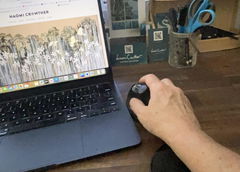
The Evoluent Vertical Mouse – D Series supports your hand
in an upright handshake-style position, reducing the amount of forearm
rotation required to use a conventional flat mouse.
Its sculpted body places the fingers and thumb on opposing sides of the
mouse, while grooved low-force buttons and a contoured
thumb rest help you control the mouse without needing a strong grip.
Available in Small, Medium and Large, with a choice of
wired or wireless connectivity, the D Series can be matched much more
closely to your hand size and workstation preferences.
Choose the right size, rest your hand around the mouse and let the shape do more of the holding.
Evoluent's vertical design combines a handshake-style hand position with
finger grooves, thumb support and an extended lower lip to create a mouse
built specifically around sustained computer use.
Designed Around How the Hand Naturally Rests
VERTICAL
Upright Hand Position
The vertical body supports the hand in a handshake-style orientation
with less forearm pronation than a conventional flat mouse.
LOW
Low-Force Clicks
The primary buttons require relatively little force to activate while
retaining enough tactile resistance for deliberate clicking.
3 SIZES
Small, Medium or Large
Choose a mouse body matched to your hand length instead of relying on
one generic size for every user.
6 BTN
Six Configurable Controls
Three finger buttons, two thumb buttons and the clickable scroll wheel
provide six controls that can be customised through Evoluent software
where supported.
Why Turn the Mouse on Its Side?
A conventional mouse usually places the palm facing down towards the
desk, which requires the forearm to rotate into that position.
The Evoluent D Series turns the control surface vertically so the hand
can remain in a more upright position while still using familiar finger
movements for clicking and scrolling.
You still move the mouse across the desk in the usual way. The main
difference is the position your hand adopts around it.
Grooved Buttons Give Your Fingers a Natural Resting Position
The D Series uses three vertically arranged finger buttons with
shallow grooves formed into their surface.
Your fingertips can settle into those grooves instead of sitting against
a completely flat button surface, helping the hand remain positioned
around the mouse with less active gripping.
The finger buttons are also designed with relatively low click force for
comfortable repetitive use.
Sculpted Thumb Support Balances the Hand
A contoured thumb rest sits opposite the finger buttons, allowing the
thumb and fingers to rest on different sides of the mouse.
Two additional buttons are positioned around the thumb area for convenient
access without requiring a large change in hand position.
An extended lower lip also supports the outside edge of the hand and helps
keep the little finger away from the desk surface.
Choose the Size That Matches Your Hand
Mouse size matters with a shaped ergonomic design because your fingers,
thumb and palm need to line up with the intended support surfaces.
Measure from the crease at your wrist to the tip of your middle
finger.
Small: Under 178mm
Medium: 178–198mm
Large: Over 198mm
Right Handed
i
Measure before choosing.
A correctly sized vertical mouse allows the thumb, fingers and palm to
sit where the contours were designed to support them.
Three Mouse Sizes for a More Personal Fit
SMALL
Small
Approximately 8.6cm wide × 10.8cm deep × 7.6cm high.
Recommended for hand lengths under approximately 178mm.
MEDIUM
Medium
Approximately 8.6cm wide × 11.1cm deep × 7.6cm high.
Recommended for hand lengths around 178–198mm.
LARGE
Large
Approximately 8.9cm wide × 11.5cm deep × 8.3cm high.
Recommended for hand lengths above approximately 198mm.
Change Pointer Speed Without Leaving the Mouse
A dedicated control behind the finger buttons lets you change cursor
sensitivity directly from the mouse.
Extra Low
Low
Medium
High
Illuminated indicators around the thumb-rest area show the selected
pointer-speed level as you make adjustments.
This makes it easy to move between slower, more controlled cursor movement
and faster movement across larger displays without opening computer
settings.
Six Controls with Optional Button Customisation
The D Series provides
three finger buttons, two thumb buttons and a clickable scroll
wheel.
Basic mouse functions work without additional configuration. Evoluent's
Mouse Manager software can also be used to customise button functions on
supported operating systems.
This can allow frequently used commands, shortcuts and navigation
functions to be assigned directly to the mouse.
i
Software functionality can vary by operating system.
The mouse retains basic functionality without the Evoluent driver, but
available customisation features may differ between systems.
Choose Wired or Wireless
WIRED
Wired USB
Connect directly through USB for a simple permanent workstation setup.
Evoluent uses an extra-long cable of approximately 2.1 metres.
WIRELESS
Wireless USB Receiver
Connect wirelessly using the supplied 2.4GHz USB receiver. The
wireless model is powered by a single AA battery.
Familiar Mouse Control in a Different Hand Position
Although the D Series looks very different from a conventional mouse, the
basic workflow remains familiar.
Move the complete mouse across the desk to control the pointer, use your
fingers for the primary buttons and scroll wheel, and use your thumb for
the additional side controls.
Most users will still benefit from allowing some time to become familiar
with the more upright orientation, particularly if they have spent years
using a flat mouse.
Designed for Everyday Professional Computer Use
Office Work
Extended Computer Use
Large Screens
Specialist Ergonomic Setups
The combination of multiple hand sizes, programmable controls and
adjustable pointer speed makes the D Series especially well suited to
people who use a mouse heavily throughout the working day.
Product Details
Product
Evoluent Vertical Mouse - D Series
Hand Orientation
Right handed
Available Sizes
Small, Medium and Large
Small Dimensions
Approximately 86 × 108 × 76mm
Medium Dimensions
Approximately 86 × 111 × 76mm
Large Dimensions
Approximately 89 × 115 × 83mm
Small Weight
Approximately 132g wired / 163g wireless
Medium Weight
Approximately 136g wired / 167g wireless
Large Weight
Approximately 158g wired / 189g wireless
Wired Connection
USB cable, approximately 2.1m
Wireless Connection
2.4GHz USB receiver
Wireless Power
1 × AA battery
Buttons
6 controls including clickable scroll wheel
Button Customisation
Evoluent Mouse Manager on supported operating systems
Pointer Speed
4 selectable levels with illuminated indicators
Sensor
Laser tracking sensor
Compatibility
Wired and wireless USB models support standard mouse functionality
across compatible Windows and Mac computers; software features vary
by operating system
Best For
Right-handed users wanting a premium vertical mouse with selectable
hand sizing, low-force controls and extensive cursor and button
customisation
✓
1-Year Warranty
The Evoluent Vertical Mouse – D Series is covered by a
one-year warranty through No More Pain Ergonomics.
If a covered fault develops during the warranty period, we'll work
with you to arrange repair or replacement in accordance with our
warranty terms.
Premium Vertical Mouse Design with a Size That Fits Your Hand
With its upright handshake-style shape, three hand sizes, sculpted thumb
support, grooved low-force buttons, six configurable controls, four
pointer-speed levels and wired or wireless options, the Evoluent Vertical
Mouse D Series combines precise mouse control with a design built around
supporting the hand in a more upright working position.