Ergonomic Mouse - ErgoSlider Plus+ Mouse

ErgoSlider Plus+ Mouse

ErgoSlider Plus+ Mouse
$395
Skip to product information
Ergonomic Mouse - ErgoSlider Plus+ Mouse

ErgoSlider Plus+ Mouse

58 reviews

$395
1-year warrantyHand Ambidextrous — left or right handConnection Wired USB
Not sure which size? Measure your hand — takes 1 minute

Pickup available at No More Pain Ergonomics Warehouse

Usually ready in 24 hours

View store information

ErgoSlider Plus+ Mouse

ErgoSlider Plus+ Mouse

No More Pain Ergonomics Warehouse

Pickup available, usually ready in 24 hours

Unit 6/53 Morrisby Street
Geebung QLD 4034
Australia

Estimated delivery
Tue 24 Nov – Thu 26 Nov
Business days only. Order before 12pm for fastest dispatch. Choose your preferred courier at checkout.
New customer? Save 5% with code Applied at checkout. Exclusions may apply.

Not sure if this is right for you?

Need help choosing? Ask our expert team a question — we’re here to help you.

Need help choosing?

Talk to our ergonomic team — we’ll help you find the right fit.

  • Designed by health professionals
  • 100,000+ people helped since 2013
  • Free pickup from our Brisbane warehouse
  • Australian owned & operated
Dimensions
Width
39cm
Depth
10.2cm
Height
2.3cm
Weight
405g
Shipping & Delivery

At checkout, you’ll be able to choose your preferred courier based on speed and cost. We work with a range of trusted carriers, including:

  • Australia Post
  • Aramex
  • Couriers Please
  • TNT
  • StarTrack
  • Hunter Express
  • FedEx

Most products are shipped from our Brisbane warehouse and typically arrive within 2–5 business days, depending on your location and the courier selected. We also offer free local pickup from our Brisbane warehouse for customers who prefer to collect their order in person.

Once your order has been dispatched, we’ll send you tracking details so you can follow your delivery every step of the way.

Returns & Exchanges

We understand that sometimes a return may be necessary, and we aim to make the process as straightforward as possible.

Returns & Exchanges

Products may be returned within 30 days of purchase for a refund or exchange of the product price, subject to the conditions below.

Return conditions

  • Items must be returned in as-new condition, with all parts included and in original packaging
  • Products that require assembly must be returned unassembled, including removal of gas cylinders for chairs
  • Items returned assembled, incomplete, damaged, or showing signs of wear may be subject to a partial refund following inspection
  • A 10% restocking fee applies to all returns, except where the item is faulty
  • Support cushions are non-returnable once opened
  • Customers are responsible for return shipping costs and are encouraged to use a trackable service

Exchanges

  • Exchanges are processed once the returned item has been received and inspected
  • Additional shipping fees apply
  • Any price difference will be invoiced prior to dispatch

Refunds

  • Refunds are processed after inspection of the returned item
  • Please allow 2–3 business days for funds to appear after approval
  • Refunds may be adjusted for restocking fees or missing/damaged components
Warranty

All No More Pain Ergonomics products are covered by a minimum 12-month warranty from the date of purchase. Some products include extended warranties of 24 months, 36 months, or up to 10 years (refer to the individual product description for details).

If your product becomes faulty or malfunctions within the warranty period, you can lodge a warranty claim via our returns portal. We will work with you to arrange either a repair or replacement, depending on the issue.

Please note

  • Warranty applies to faulty goods only within the warranty period
  • Warranty outcomes are limited to repair or replacement (no refunds outside the 30-day return period)
  • If a product is no longer available, a comparable product may be supplied
  • Return shipping for warranty claims is the responsibility of the customer
  • Replacement items are shipped at no cost to you
For health professionals

Information to help occupational therapists, physiotherapists, exercise physiologists, osteopaths and other health professionals recommend this product and complete assessment reports.

When to recommend

Employee has acute pain or discomfort in right or left hand, wrist, forearm or shoulder

Employee has pain or discomfort while gripping a mouse

Employee's occupational duties require frequent computer use

Employee is required to alternate between using right and left hand for mouse use

Details for your report

PRODUCT NAME

ErgoSlider Plus+ Mouse

CLINICAL JUSTIFICATION

The ErgoSlider Plus+ is recommended to reduce shoulder abduction and lateral reach associated with a conventional mouse positioned beside the keyboard. The central roller bar sits directly in front of the keyboard, allowing cursor control with the arms close to the body and shoulders in a neutral position. It can be operated with either hand, allowing mousing load to be shared, and requires no grip strength, reducing sustained hand and forearm muscle activity. An integrated wrist support provides a resting surface for the hands.

SPECIFICATIONS

  • Central roller-bar mouse positioned in front of the keyboard
  • Ambidextrous – operated with either hand
  • Integrated wrist support (replacement pad available)
  • Copy and paste shortcut buttons
  • Wired USB; plug-and-play; Windows and Mac compatible

DIMENSIONS

Width: 39cm
Depth: 10.2cm
Height: 2.3cm
Weight: 405g

SUPPLIER DETAILS

Supplier: No More Pain Ergonomics

Product code: Ergo-Slider-Plus

URL: https://www.nomorepainergonomics.com.au/products/ergoslider-plus-mouse

Dimensions

Width: 39cm
Depth: 10.2cm
Height: 2.3cm
Weight: 405g

Product code, price & link

ErgoSlider Plus+ Mouse
Product code
Ergo-Slider-Plus
Option
ErgoSlider Plus+ Mouse
Price
$395.00 AUD incl. GST
Link
www.nomorepainergonomics.com.au/products/ergoslider-plus-mouse

Copy image pastes straight into Word or Google Docs. If your browser doesn’t support it, open the full-size image and right-click → Copy image.

Copies the product name, clinical justification, specifications, dimensions, product code, price and link for the option currently selected.

Purchasing options for your client

  • Employer pays — recommend this product in your report and the employer can contact us directly to purchase.
  • Insurer pays — order online and select Invoice to Insurer at checkout, or email us the order details. We confirm the claim, invoice the insurer and ship to your client.
  • You pay — purchasing as part of your own service? Contact us and we can issue an invoice.
Buying for work

Corporate & government

We work directly with corporate and government customers across Australia. For eligible orders, we can invoice your organisation and accept purchase orders.

If your organisation requires invoicing or a purchase order to proceed, generate a formal quote online, then accept it with your purchase order number.

Central mouse control — directly in front of you

What If You Didn't Have to Reach Sideways for Your Mouse?

A traditional mouse usually sits beside your keyboard, which means every time you move from typing to mousing, your arm has to travel out to the side.

If you repeat that movement hundreds of times across a working day, the combination of reaching, gripping and one-sided mouse use can contribute to fatigue and discomfort through the shoulder, arm, wrist and hand.

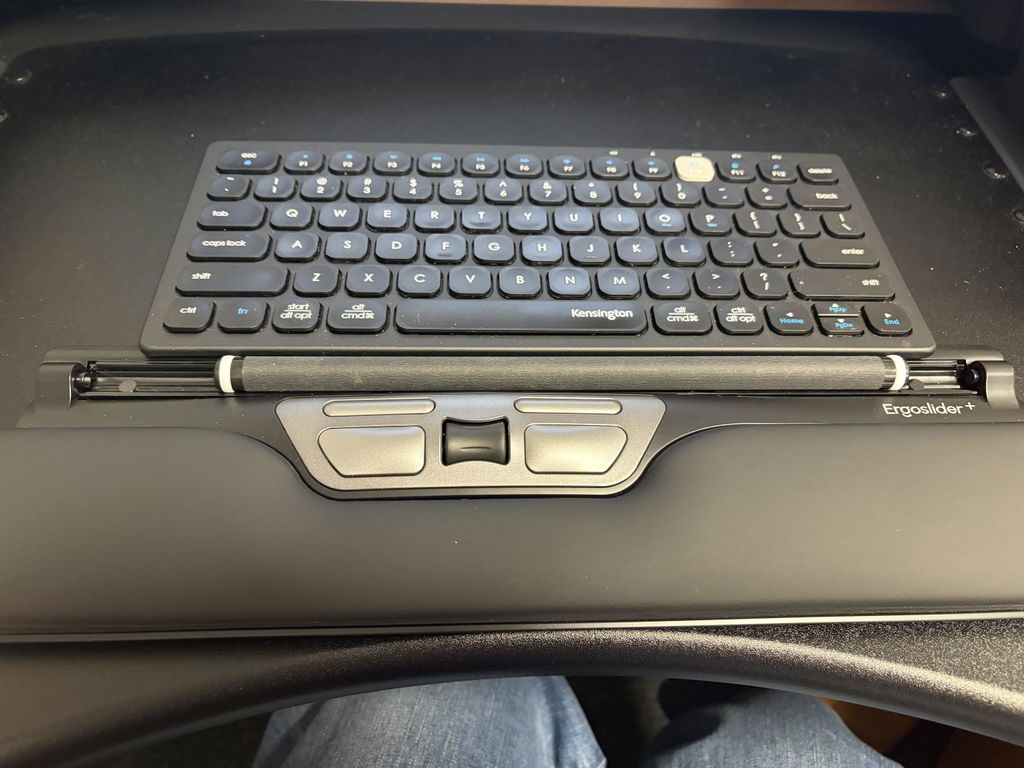
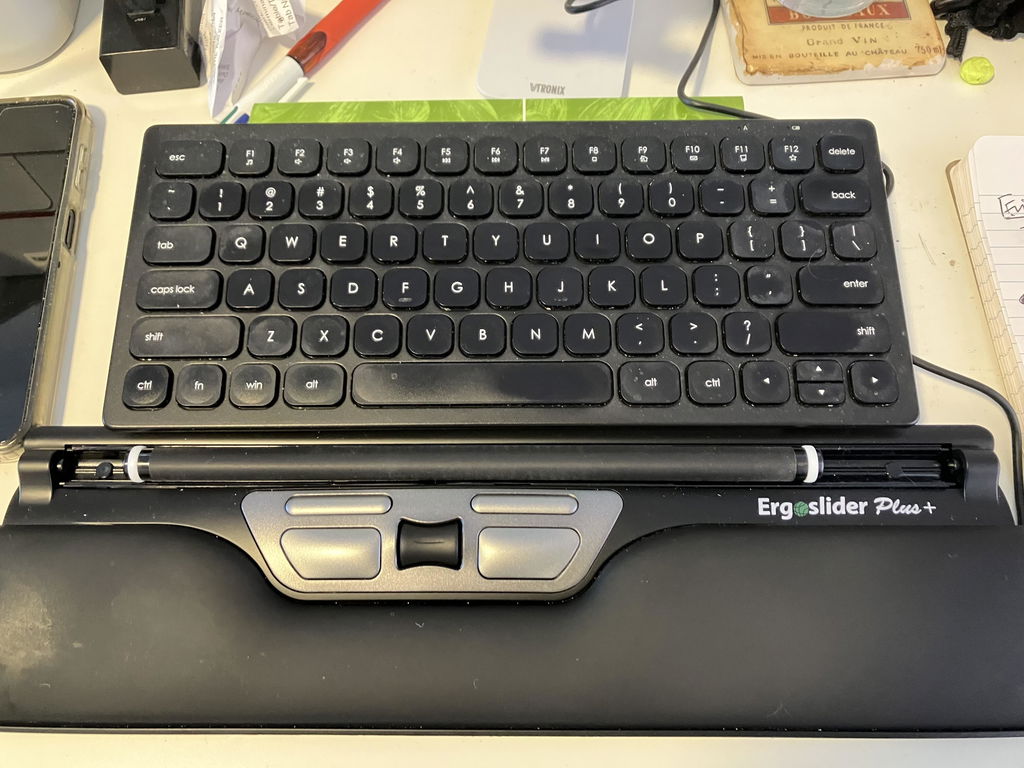
The ErgoSlide Plus+ Mouse takes a completely different approach. It sits centrally in front of you, directly beneath your keyboard, so cursor control stays within easy reach of both hands.

Keep your mouse in front of you — not out to the side.

Instead of repeatedly reaching for and gripping a conventional mouse, use your fingers to move the central roller bar while your arms remain closer to your body.

Particularly Useful When a Traditional Mouse Has Become Uncomfortable

The ErgoSlide Plus+ is especially well suited to people who perform repetitive computer work and find conventional side-positioned mouse use uncomfortable.

Customers have specifically used it as an alternative after developing shoulder discomfort from traditional mouse use, while others value being able to move away from years of dominant-hand mousing.

Shoulder Discomfort
Repetitive Mouse Work
Left or Right Hand Use
Central Workstations

Why Put the Mouse in the Centre?

With a conventional mouse, most people consistently reach one arm away from the keyboard to the same side of the desk.

ErgoSlide changes the location of your pointing device altogether.

↔

Reduces Side-Reaching

Central positioning means you don't need to repeatedly move your mouse arm away from your body every time you switch from typing to cursor control.

2

Use Either Hand

Because the roller bar sits in the centre, either hand can control the cursor without moving or reconfiguring the mouse.

✓

Less Gripping

Rather than holding and moving a mouse around the desk, your fingers glide the roller bar to control the cursor.

⌨

Close to Your Keyboard

Position it directly beneath your keyboard so your typing and mouse controls remain together within the central working area.

No Mouse to Pick Up, Grip or Push Around the Desk

The ErgoSlide uses a roller-bar control system rather than a conventional moving mouse body.

Use your fingers to move the roller bar left, right, forwards and backwards to control the cursor.

Your hand can then move to the dedicated left-click, right-click and scrolling controls without reaching to the side of your keyboard.

For someone accustomed to a conventional mouse, it looks very different — but the basic cursor movements are straightforward once you become familiar with the roller.

Worried It Will Be Difficult to Learn?

That's a common concern because the ErgoSlide works differently from the mouse you've probably used for years.

Customer feedback is reassuring. Users who expected a difficult transition have reported becoming comfortable with the roller system after only a few days, while other customers specifically describe it as easy to use.

i

Give yourself a few days. Your cursor-control habits have probably been built over many years. Some initial unfamiliarity is normal when moving to a completely different pointing method.

If Reaching for Your Mouse Is the Problem, Change Where the Mouse Lives

Sometimes changing the shape of the mouse isn't enough.

If your discomfort is aggravated by repeatedly moving your arm out to the side to reach a traditional mouse, a centrally positioned pointing device tackles the workstation setup from a different direction.

The ErgoSlide keeps mouse control directly in front of you, reducing the need for repetitive lateral reaching during everyday computer work.

i

Already experiencing persistent shoulder, arm or wrist pain? The ErgoSlide changes your working position but isn't a medical treatment. Consider discussing ongoing symptoms and your workstation setup with your physiotherapist, occupational therapist or other treating health professional.

Switch Hands Without Switching Mice

One of the strongest ergonomic advantages of a centrally controlled mouse is that it doesn't belong to one hand.

The roller bar can be operated with your left hand, right hand or a combination of both.

That gives you the option to share mouse work between sides rather than automatically placing every cursor movement onto your dominant hand.

L

Left-Hand Control

Move the roller with your left hand whenever you want to change sides or distribute your mouse workload.

R

Right-Hand Control

Continue using your dominant right hand without needing the mouse positioned away from the centre of your workstation.

Integrated Support Across the Front of Your Workstation

The ErgoSlide includes a built-in padded wrist-support area, giving your hands a supported surface immediately in front of the keyboard and controls.

This helps create one continuous central work area rather than having your keyboard in front of you and mouse isolated somewhere off to the side.

Controlled Cursor Movement Without Excessive Sensitivity

The ErgoSlide operates at 800 DPI, providing controlled everyday cursor movement rather than extremely high mouse sensitivity.

This is particularly useful when learning the roller-bar system because smaller finger movements don't send the cursor racing uncontrollably across the screen.

Customer feedback specifically notes that the mouse isn't overly sensitive, helping make it easier to learn and control.

How to Position Your ErgoSlide

Correct positioning is what creates the main ergonomic benefit.

1

Place It Beneath Your Keyboard

Position the ErgoSlide centrally in front of you with the keyboard immediately behind it.

2

Keep Your Elbows Close

Bring the keyboard and ErgoSlide close enough that you don't need to reach forwards or sideways to operate them.

3

Experiment with Both Hands

Try operating the roller with either hand rather than automatically returning all mouse work to your dominant side.

Works Especially Well with a Compact Keyboard

The ErgoSlide is 39cm wide, allowing it to sit centrally beneath many desktop keyboards.

Pairing it with a compact keyboard can create an especially efficient central workstation because both your typing and mouse controls remain close to the centre of your body.

That combination can reduce both the sideways mouse reach and the overall amount of desk space required for your primary input devices.

Who Is the ErgoSlide Plus+ Best Suited To?

  • People wanting to reduce sideways mouse reaching
  • Users experiencing shoulder or arm fatigue from mouse work
  • People wanting an ambidextrous pointing device
  • Users who want to share workload between both hands
  • Long-hour office and computer workers
  • Users who dislike gripping a conventional mouse
  • Ergonomic and return-to-work workstation setups
  • Users willing to learn a different cursor-control method

Simple Wired USB Connection

The ErgoSlide uses a wired USB connection, so there are no batteries to replace, no charging cycle and no wireless pairing process.

Connect the USB cable to a compatible computer and the mouse is designed for straightforward plug-and-play use without driver installation.

✓

140cm cable length: provides flexibility when routing the cable around your keyboard, monitor and workstation setup.

Product Details

Mouse Style
Central roller-bar ergonomic mouse
Hand Orientation
Ambidextrous — left or right hand
Width
39cm
Depth
10.2cm
Height
2.3cm
Weight
405g
Cursor Control
Central roller bar
Resolution
800 DPI
Controls
Left click, right click, roller-bar cursor control and scrolling
Wrist Support
Integrated padded support
Connection
Wired USB
Cable Length
140cm
Setup
Plug-and-play — no driver installation required
Compatibility
Compatible with supported Windows and Mac computers

Is a Roller-Bar Mouse Right for You?

✓

A Strong Choice If...

You want to reduce sideways mouse reaching, avoid gripping a traditional mouse or alternate cursor control between your left and right hands.

!

Expect Something Different If...

You've only ever used a conventional mouse. The roller-bar movement feels different initially and may require a short adjustment period before it becomes automatic.

Not Sure Whether You Need a Vertical Mouse or a Central Mouse?

The answer often depends on what's contributing to your discomfort.

A vertical mouse changes how your hand and forearm hold the mouse. The ErgoSlide changes where the pointing device sits and how you control it.

If reaching sideways, gripping or one-sided mouse use are major concerns, the ErgoSlide may be particularly worth considering.

Use the Ask a Question option on this page and tell us where you're experiencing discomfort, what type of computer work you perform and what mouse you're currently using. Our team can help you compare the options.

Stop Taking Your Arm to the Mouse. Bring the Mouse to You.

If repeatedly reaching to the side for a conventional mouse has become uncomfortable, the ErgoSlide Plus+ gives you a fundamentally different way to work — central cursor control, either-hand operation and no traditional mouse body to grip and push around the desk.
FAQs

ErgoSlider Plus+ Mouse: your questions answered

How does the ErgoSlider Plus work?
It sits centrally below your keyboard. You move the cursor by rolling and sliding a bar with your fingers, with click and scroll controls beside it, so you do not reach out to the side for a mouse.
Can I use it with either hand?
Yes. Because it sits in the centre, either hand can control the cursor without changing any settings.
How long does it take to get used to?
Customers often feel comfortable with it within a few days. Expect some unfamiliarity at first if you have used a standard mouse for years.
Is it wired or wireless?
It is wired.
Can I buy a replacement wrist pad?
Yes. Choose ErgoSlider Plus Replacement Wrist Pad from the options on this page.

Customer reviews

Rated 4.7 out of 5 from 58 reviews of this product.

You may also like

View all ergonomic mice