Thumb-controlled precision without moving the mouse across your desk
Want Precise Mouse Control Without Constantly Moving Your Arm Across the Desk?
The JOMAA Ergonomic Trackball Vertical Mouse combines an
ergonomic right-handed shape with a smooth
thumb-controlled trackball, allowing you to move the
cursor while the mouse itself stays largely stationary.
This gives you a completely different way to navigate your computer and
makes it particularly useful when desk space is limited or you prefer
precise cursor control without repeatedly sliding a mouse around.
Bluetooth and 2.4GHz wireless connectivity, USB-C rechargeable power and
a convenient 5-button layout make it an easy addition to everyday office,
home and mobile workstations.
Move the cursor with your thumb while the mouse stays in one place.
The trackball gives you smooth directional control without needing a large
clear area of desk for traditional mouse movement.
A Different Way to Control Your Cursor
BALL
Thumb-Controlled Trackball
Roll the integrated trackball with your thumb to control the cursor
rather than moving the complete mouse around the desk.
ERGO
Ergonomic Right-Handed Shape
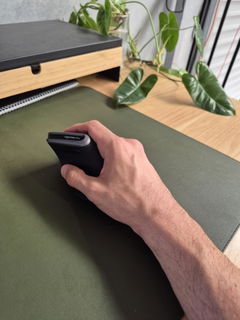
The sculpted body supports the hand in a more upright position than a
conventional flat mouse.
BT + USB
Dual Wireless Connectivity
Connect using Bluetooth or the included 2.4GHz wireless USB receiver
to suit your device and workstation.
USB-C
Rechargeable Power
The built-in rechargeable battery charges via USB-C, removing the need
to continually replace disposable batteries.
How Does a Trackball Mouse Work?
With a conventional mouse, you move the whole device across the desk and
the cursor follows that movement.
With the JOMAA Trackball Mouse, the body of the mouse can remain
stationary while your thumb rolls the ball to move the pointer.
Small thumb movements can move the cursor across the screen, while your
fingers remain positioned over the main buttons and scroll wheel.
Once you become familiar with the movement, it provides a very controlled
way to navigate documents, spreadsheets, websites and everyday computer tasks.
Particularly Useful When Desk Space Is Limited
Because the mouse does not need to travel across the work surface, you can
operate it in a much smaller area than a conventional mouse.
That makes the JOMAA especially practical for compact desks, busy
workstations and setups where there simply isn't much clear space beside
the keyboard.
Compact Desks
Home Offices
Hot Desks
Mobile Workstations
A Sculpted Shape for a More Upright Hand Position
The JOMAA combines its trackball control with an ergonomic right-handed
body rather than using the flat profile of a conventional mouse.
This changes the relationship between your hand, wrist and forearm while
you work and allows the hand to sit in a more upright position around the device.
The generous sculpted body provides a substantial surface for the hand
while the thumb remains positioned beside the trackball for cursor movement.
Precise Control from Small Thumb Movements
A trackball allows fine cursor movements without requiring the entire hand
and arm to travel across the work surface.
This can make it particularly appealing for work involving repeated cursor
placement, spreadsheets, document navigation, browsing and other tasks
where controlled pointer movement matters.
You can also reposition your thumb on the trackball during larger cursor
movements without having to lift and reposition the whole mouse.
Choose Bluetooth or 2.4GHz Wireless
The JOMAA gives you two convenient ways to connect.
BT
Bluetooth
Connect directly to compatible Bluetooth devices without occupying a
standard USB port.
2.4G
Wireless USB Receiver
Use the 2.4GHz receiver for straightforward wireless connection to a
compatible USB-equipped computer.
This flexibility makes it easy to incorporate the mouse into desktop,
laptop and compatible tablet-based workstations.
Recharge with USB-C Instead of Replacing Batteries
The built-in rechargeable battery helps keep everyday ownership simple.
When the battery runs low, connect a USB-C charging cable rather than
keeping disposable batteries on hand.
That is particularly convenient for a mouse that moves between home,
office and mobile work setups.
Practical 5-Button Layout for Everyday Navigation
The JOMAA combines its thumb trackball with a familiar selection of
controls for everyday computer use.
The five-button layout keeps commonly used mouse functions close to the
fingers while the thumb remains responsible for cursor movement.
This makes it suitable for routine office work, document navigation,
browsing and general computer tasks without an overly complicated control layout.
Flexible Compatibility Across Everyday Devices
The JOMAA is designed for use across compatible
Windows, Mac and iPad-based setups.
Bluetooth connectivity makes it especially convenient for devices where
available USB ports are limited, while the 2.4GHz receiver gives you
another straightforward wireless option for compatible computers.
Give Your Thumb a Little Time to Learn the Trackball
If you have spent years controlling a cursor by moving a traditional
mouse, trackball movement can feel different at first.
Start with normal everyday tasks and allow your thumb to become familiar
with controlling direction and distance.
As the movement becomes more familiar, you can begin using smaller thumb
movements for increasingly precise pointer control.
i
A short adjustment period is normal.
Trackball control uses a different movement pattern from a conventional mouse.
Keep the Mouse Close to Your Keyboard
One of the advantages of a stationary trackball is that it can remain in
one convenient location beside your keyboard.
Position it where your arm can stay comfortably close to your body rather
than reaching out to the side.
1
Position It Close
Place the mouse immediately beside your keyboard where your hand can
reach it comfortably.
2
Rest Your Hand Naturally
Allow your hand to settle around the ergonomic shape without gripping
the mouse more firmly than necessary.
3
Control with Your Thumb
Roll the trackball smoothly to move the cursor while the mouse remains
stationary on the desk.
Keep the Trackball Clean for Smooth Movement
Like other trackball devices, occasional cleaning helps maintain smooth
and consistent cursor control.
Dust and debris can gradually collect around the trackball socket during
regular use.
The trackball can be removed for gentle cleaning of the ball and internal
contact area, then returned to its normal position.
i
Regular light cleaning is better than waiting for movement to feel rough.
Follow the supplied product instructions when removing and reinserting the trackball.
A Practical Choice for Everyday Computer Work
Office Work
Spreadsheets
Document Work
Home Offices
It is particularly useful for right-handed users who value controlled
cursor movement, want to minimise the physical space required for mousing
and prefer a rechargeable wireless setup.
Different Cursor Control Can Change the Way You Use Your Arm
Because the cursor is controlled by the thumb, the mouse body can remain
stationary rather than repeatedly travelling across the desk.
This changes the movement pattern used during computer work and may feel
more comfortable for some people.
Mouse comfort is still influenced by hand position, keyboard width,
desk height, workload and individual factors, so the JOMAA works best as
part of a well-arranged workstation.
If you are experiencing persistent hand, wrist, forearm or shoulder
symptoms, consider seeking advice from an appropriate health professional.
Product Details
Product Type
Ergonomic wireless trackball mouse
Hand Orientation
Right-handed
Cursor Control
Thumb-operated trackball
Length
Approximately 11.5cm
Width
Approximately 9.2cm
Height
Approximately 7.1cm
Connectivity
Bluetooth + 2.4GHz wireless USB receiver
Power
Built-in rechargeable battery
Compatibility
Compatible Windows, Mac and iPad-based setups
Best For
Right-handed users wanting precise thumb-controlled cursor movement,
minimal desk-space requirements and rechargeable wireless connectivity
Control More of Your Screen Without Moving More of Your Mouse
With a thumb-operated trackball, ergonomic right-handed shape, Bluetooth
and 2.4GHz wireless connectivity and USB-C rechargeable power, the JOMAA
gives you precise cursor control from a compact stationary mouse that fits
neatly into almost any workstation.