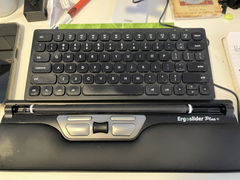
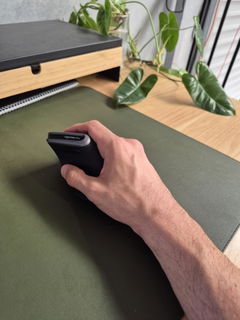
Numeric entry without the width of a full-size keyboard
Love Your Compact Keyboard but Still Need a Number Pad?
A compact keyboard can free up valuable desk space and allow your mouse
to sit closer to your body, but removing the built-in number pad is not
always practical if your work involves regular numeric entry.
The Mini Numeric Wireless Keypad gives you the number
pad when you need it, without permanently adding that extra width to your
keyboard.
Place it on the left or right side of your keyboard,
move it closer when entering numbers, then reposition it when you return
to mouse-heavy work.
Keep the compact keyboard. Add the numeric keypad separately.
You get fast access to numeric entry without committing to the permanent
width of a traditional full-size keyboard.
Built for People Who Work with Numbers but Still Want a Compact Desk Setup
If spreadsheets, calculations, invoicing or data entry are part of your
day, reaching for the number row across the top of a keyboard can quickly
become inefficient.
A separate keypad gives you the familiar numeric layout while letting you
decide exactly where it sits.
#
Dedicated Numeric Entry
Keep frequently used numbers and calculation keys together in a familiar
keypad layout for faster repetitive entry.
↔
Left or Right Placement
Position the keypad on whichever side works best for your task,
dominant hand and workstation layout.
BT
Wireless Connectivity
Connect through Bluetooth or the wireless USB receiver without adding
another cable across your desk.
↓
Compact Low-Profile Design
Small enough to fit easily into a compact workstation while still
providing dedicated numeric controls.
Why Separate the Number Pad from the Keyboard?
A built-in number pad adds considerable width to a standard keyboard.
For a right-handed mouse user, that extra width can push the mouse
further away from the main typing area.
Separating the keypad allows you to keep your main keyboard compact,
position your mouse closer when numeric entry is not required, then bring
the number pad into your workspace when you need it.
It gives you more control over your desk layout rather than having one
fixed keyboard arrangement dictate where everything else has to sit.
An Ideal Partner for a Compact Keyboard
One of the main reasons to choose a compact keyboard is to remove keys you
do not need constantly and reduce the physical width of the keyboard.
The Mini Numeric Wireless Keypad lets you keep that advantage while still
giving you dedicated numeric entry when the task requires it.
K
Keep Your Main Keyboard Compact
Avoid permanently adding a full numeric section to your everyday
keyboard footprint.
M
Keep More Room for Your Mouse
Move the keypad away when you are not using it so your mouse can remain
close to the main keyboard.
Put the Number Pad Where It Makes Sense for Your Work
A separate keypad is not locked permanently to the right side of your keyboard.
You can position it where it best suits the task you are performing.
L
Position It on the Left
A useful option for right-handed mouse users who want to keep the mouse
close while entering numbers with the opposite hand.
R
Position It on the Right
Keep the familiar traditional number-pad position if that is how you
prefer to enter numeric data.
i
Try both positions.
If you have always used a number pad with your right hand, left-side
placement may initially feel unfamiliar. Give yourself time to decide
which setup works best for your workflow.
Particularly Useful for Numeric-Heavy Work
Accounting & Finance
Spreadsheet Work
Data Entry
Compact Workstations
It is also useful for payroll, bookkeeping, invoicing, administration and
any role where dedicated numeric entry is useful but a full-size keyboard
is not required all day.
Small Enough to Move Between Workstations
Measuring just 10.4cm wide × 12.7cm long, the Mini Numeric
Wireless Keypad takes up very little desk space.
Its compact size also makes it easy to move between the office and home,
place beside a laptop or pack away when numeric entry is not part of the
task you are working on.
This makes it particularly practical for hybrid workers who want the same
numeric keypad available across different work locations.
Low-Profile Keys for a Compact Working Position
The keypad measures approximately
0.6cm at its lowest point and 1.75cm at its highest, with
a gentle inclined profile.
The low-profile key design keeps the keypad compact and avoids the height
of a large traditional desktop numeric pad.
Position it close enough that you can enter numbers without repeatedly
stretching your arm across the desk.
Choose Bluetooth or Wireless USB
Different computers and workstations have different connection requirements,
so the Mini Numeric Wireless Keypad gives you two wireless options.
B
Bluetooth
Connect wirelessly to a compatible Bluetooth-enabled computer without
occupying a USB port.
U
Wireless USB
Use the wireless USB receiver when you prefer a dedicated plug-and-use
wireless connection.
Useful If Your Laptop Doesn't Have a Number Pad
Many smaller laptops remove the dedicated numeric keypad to keep the device
narrow and portable.
That is useful until you need to spend an afternoon entering figures into
a spreadsheet.
A separate wireless keypad lets you add dedicated numeric entry to the
workstation without replacing your laptop or carrying a full-size external
keyboard purely for the number pad.
Bring It In When You Need It. Move It Away When You Don't.
One of the biggest advantages of a separate keypad is that its position
does not need to remain permanent.
1
Position Your Main Keyboard
Keep the main typing area centred comfortably in front of your body.
2
Add the Keypad for Numeric Work
Bring the keypad close to whichever hand you want to use for calculations
and data entry.
3
Move It When You're Finished
Reclaim the space beside your keyboard when you return to typing or
mouse-heavy work.
The Ergonomic Benefit Is Flexibility
A numeric keypad is not ergonomic simply because it is smaller.
The real advantage is that separating it from the main keyboard lets you
organise your workstation around the task you are doing.
You can keep your main keyboard and mouse close together for normal
computer work, then position the keypad where it is easiest to reach when
you need to enter numbers.
That flexibility is particularly valuable for people who use a compact
keyboard specifically to reduce the width of their workstation.
Is a separate keypad right for you?
It Makes the Most Sense When You Want Numeric Entry Without a Full-Size Keyboard
If you already use a full-size keyboard with a built-in numeric pad and
are completely happy with its width and position, a separate keypad may
add little benefit.
This product is most useful when you use a compact keyboard, laptop or
flexible workstation and still need convenient access to a dedicated number pad.
Product Details
Product Type
Mini wireless numeric keypad
Height
Approximately 0.6cm to 1.75cm
Incline
Approximately 15°
Key Style
Low-profile numeric keys
Connectivity
Bluetooth or wireless USB receiver
Positioning
Can be positioned on the left or right side of the keyboard
Power
1 × AAA battery, not included
Best For
Numeric data entry, compact keyboards, laptops and flexible workstations
Is the Mini Numeric Wireless Keypad Right for You?
✓
A Strong Choice If...
You want to use a compact keyboard or laptop but still need a dedicated
numeric keypad for calculations, spreadsheets or regular data entry.
!
You May Not Need One If...
Your existing full-size keyboard already provides a number pad and its
extra width does not interfere with your preferred keyboard and mouse position.
Not Sure Whether to Choose a Compact Keyboard and Separate Keypad?
Use the Ask a Question option on this page and tell us what
keyboard you currently use, how often you enter numeric data and which hand
you use for your mouse.
Our team can help you compare a separate keypad setup with the other
ergonomic keyboard options in our range.
✓
1-Year Warranty
The Mini Numeric Wireless Keypad is covered by a
one-year warranty. If a fault develops during the
warranty period, we'll work with you to arrange repair or replacement
in accordance with our warranty terms.
Keep Your Keyboard Compact Without Giving Up the Number Pad
If numeric entry is important to your work but you do not want a wide
full-size keyboard permanently taking up desk space, the Mini Numeric
Wireless Keypad gives you a simple, flexible number pad that can sit exactly
where you need it.