A Vertical Mouse Designed to Let Your Hand Rest Around It
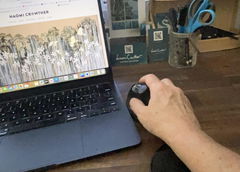
The X-45 Vertical Ergonomic Mouse uses a deeply sculpted right-handed shape designed to follow the contours of the hand and thumb rather than requiring you to continually grip a conventional flat mouse.
Its vertical orientation places the hand in a more upright position, while the shaped body provides a broad surface for the palm and fingers during everyday computer work.
With Bluetooth, 2.4GHz wireless and wired USB-C connectivity, a rechargeable battery and adjustable cursor sensitivity, the X-45 combines ergonomic comfort with the flexibility to suit a wide range of work setups.
Let the mouse support your hand instead of gripping the mouse all day.
The X-45's sculpted vertical shape gives your palm, fingers and thumb a defined place to rest while you work.
Comfortable Shape, Flexible Connectivity and Precise Control
Custom-Contoured Ergonomic Design
The sculpted vertical body provides support around the palm, fingers and thumb rather than relying on a flat mouse profile.
Triple Connectivity
Choose Bluetooth, 2.4GHz wireless USB or a direct wired connection depending on your computer and preferred way of working.
Adjustable Cursor Sensitivity
Five DPI settings let you change how quickly the pointer responds to your mouse movement.
Built-In Rechargeable Battery
Recharge through USB-C rather than regularly replacing disposable batteries.
Designed Around the Hand, Not Just the Sensor
The X-45's defining feature is its deeply shaped body.
Instead of simply turning a conventional mouse on its side, the mouse is contoured to provide a resting surface around the palm, fingers and thumb.
This allows the hand to settle around the device with less need to continually squeeze or pinch the mouse simply to maintain control.
For prolonged office work, that supportive shape can be just as important as cursor accuracy or connection type.
A More Upright Hand Position for Everyday Computer Work
A conventional flat mouse generally places the palm closer to facing the desk.
The X-45's vertical design allows the hand and forearm to work in a more upright orientation around the mouse.
Combined with the sculpted thumb and finger areas, this creates a different working position that may feel more comfortable for some users during prolonged mousing.
Designed Around a Medium Hand Fit
Mouse size matters because your fingers still need to reach the buttons comfortably while the palm remains supported by the main body.
The X-45 supplied by No More Pain Ergonomics is positioned for right-handed users with medium-sized hands.
Its sculpted design provides a substantial resting surface without requiring you to constantly reposition your hand to reach the primary controls.
Use It Wireless, Bluetooth or Wired
The X-45 gives you three ways to connect, making it easy to adapt to different workstation setups.
Wireless USB Receiver
Connect using the compact USB receiver for straightforward plug-and-play wireless computer use.
Bluetooth
Pair directly with a compatible Bluetooth device without occupying a standard USB port.
USB-C Wired Mode
Connect the data cable and continue using the mouse as a wired device when required.
Use While Charging
Wired operation means your work does not need to stop simply because the rechargeable battery needs power.
Choose the Cursor Speed That Feels Right
The X-45 provides five selectable DPI settings: 800, 1200, 1600, 2000 and 4800 DPI.
Lower sensitivity settings provide more deliberate pointer movement, while higher settings let the cursor travel further across the screen from less physical mouse movement.
Try a few settings rather than automatically choosing the highest one. Screen size, task and personal preference all influence which sensitivity feels most controlled.
Convenient Controls for Everyday Navigation
In addition to the standard left, right and scroll controls, the X-45 includes dedicated forward and backward navigation buttons.
These can make web browsing and compatible document navigation quicker by keeping commonly used actions directly beneath the fingers.
Available button functionality can vary depending on your operating system and application.
Rechargeable Power Keeps Everyday Use Simple
The built-in lithium battery means you do not need to keep disposable batteries beside your workstation.
Charge the X-45 via USB-C when required, or connect the cable and continue working in wired mode.
This makes it equally practical for a permanent desktop setup or a mouse that moves between home and office.
Made for the Computer Work You Do Every Day
The combination of ergonomic shaping, adjustable DPI and three connection modes makes the X-45 particularly versatile for users who spend substantial time working with a mouse.
Let the Shape Support Your Hand
Keep It Close
Position the mouse directly beside your keyboard so your upper arm does not need to continually reach away from your body.
Rest Your Hand
Allow your palm, fingers and thumb to settle naturally around the contoured shape rather than squeezing the mouse tightly.
Adjust the DPI
Choose a pointer sensitivity that lets you navigate comfortably without excessive mouse movement.
New to a Vertical Mouse?
The X-45 may initially feel different if you have spent years using a conventional flat mouse.
Give yourself a little time to become familiar with the more upright hand position and the location of the side controls.
Start with normal work tasks and focus on allowing your hand to remain relaxed rather than gripping the device tightly.
Use It as Part of a Comfortable Workstation
Mouse comfort is influenced by the whole workstation, not just the mouse.
Keep the X-45 close to your keyboard, set your desk and chair so your shoulders can remain relaxed, and avoid unnecessary reaching while you work.
Individual comfort varies. If you experience persistent hand, wrist, forearm or shoulder symptoms, consider seeking advice from an appropriate health professional.
Product Details
Let Your Hand Rest into the Mouse Instead of Continually Gripping It
With its deeply contoured medium-hand design, upright right-handed positioning, five DPI settings, rechargeable battery and choice of Bluetooth, wireless USB or wired USB-C connectivity, the X-45 combines ergonomic support with the flexibility needed for everyday computer work.